Booking change
still needs to reach the lesson roster

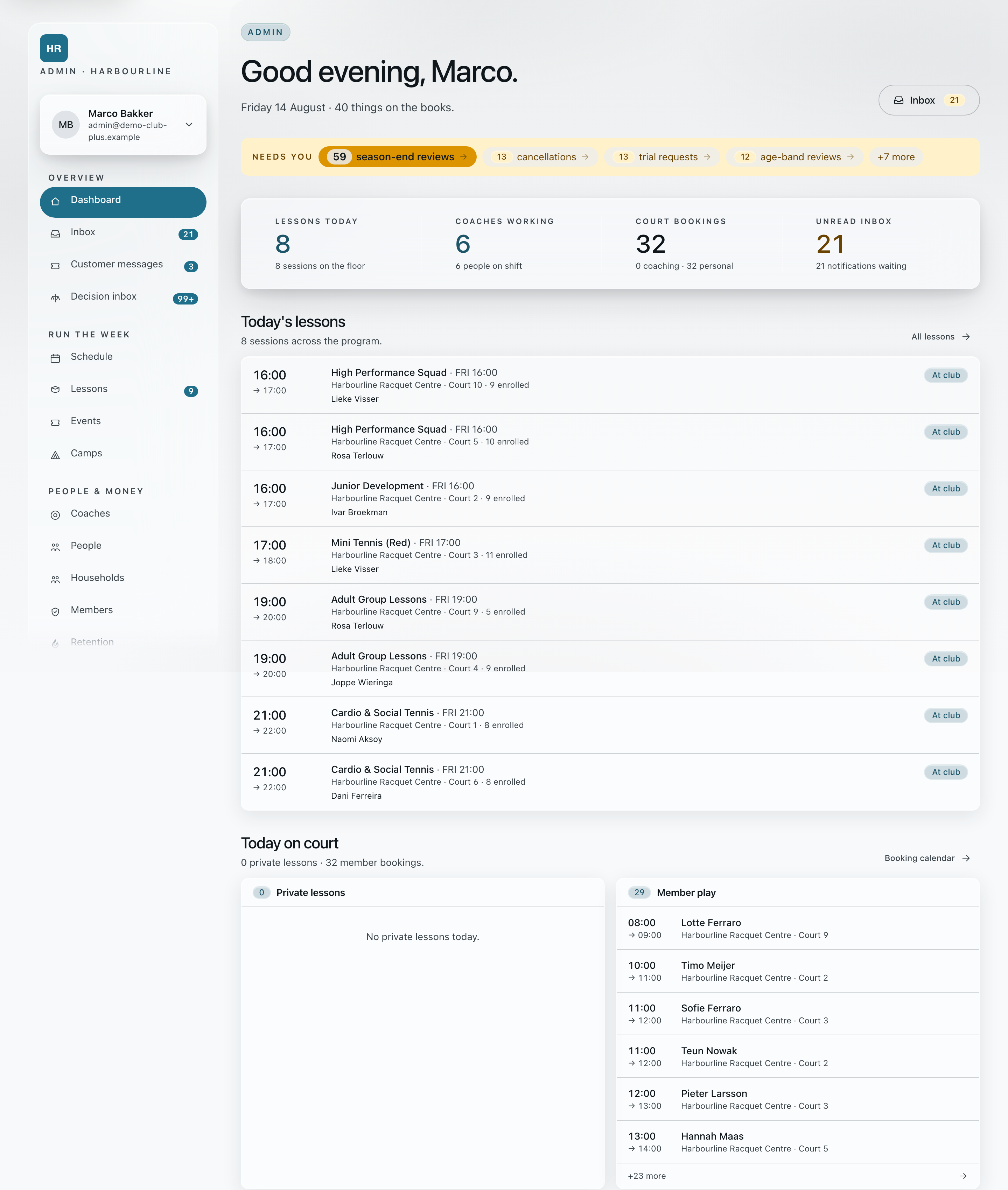
The office runs enrollment, courts, coaches, attendance, messages and payments in the browser. Coaches and households see each change on their phones.
A 45-minute working session inside Academy, at your club or online.
The screens below show Academy with sample club data.
01 · The coordination problem
still needs to reach the lesson roster
gets checked separately before the office can act
is easy to miss when the office needs an answer
still needs an answer for every family
must reach the session, substitute and calendars
Make the change once. The coach’s phone and the family’s app already show it.
02 · One club week · five everyday situations
The screens use sample club data. Choose any step to see what the household, office or coach sees next.
01 The sign-up · household → office
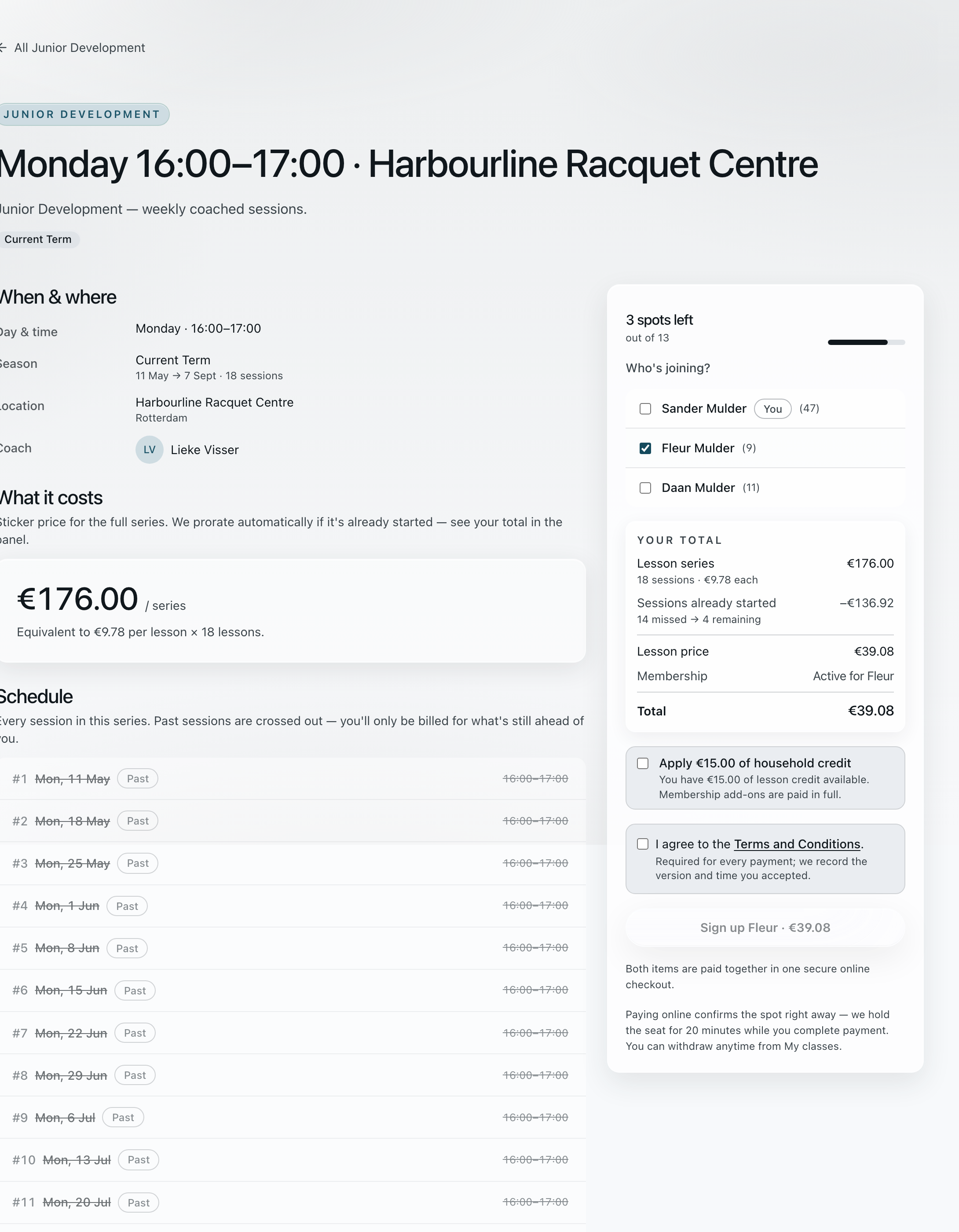
Her household sees the finished sessions come off the price before confirming. The sign-up lands in the office roster with its date, and the household and the coach are already in the same class thread. Camps and one-off events sign up the same way.
Every group shows its price and whether there is room.
Monday 16:00–17:00 · your total
€15.00 of household credit can be applied at checkout.
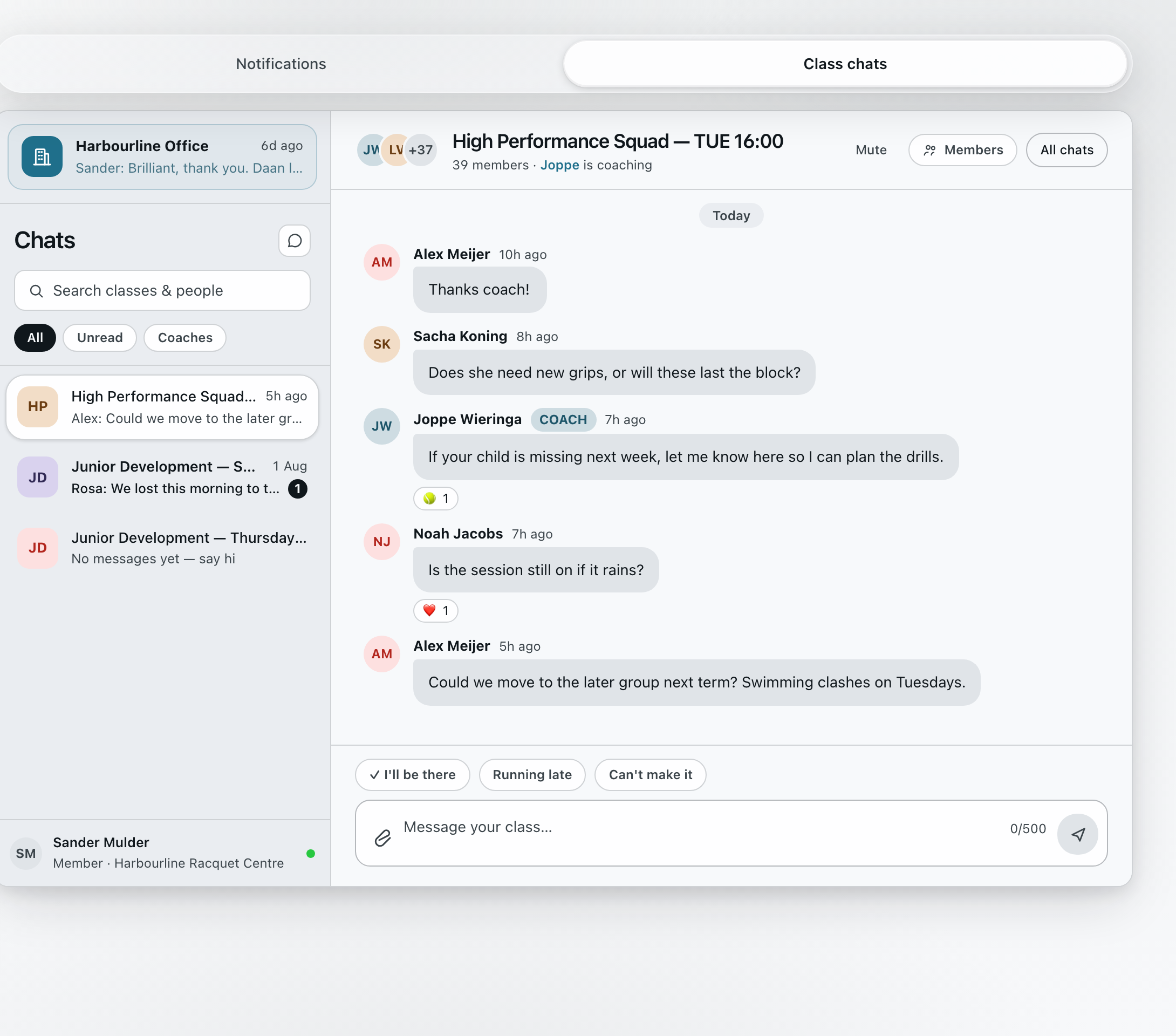
High Performance Squad — TUE 16:00 · the coach is named at the top
Attendance · this week
Who’s coming this week?
The office can read the thread too.
Each place carries the date it was taken.
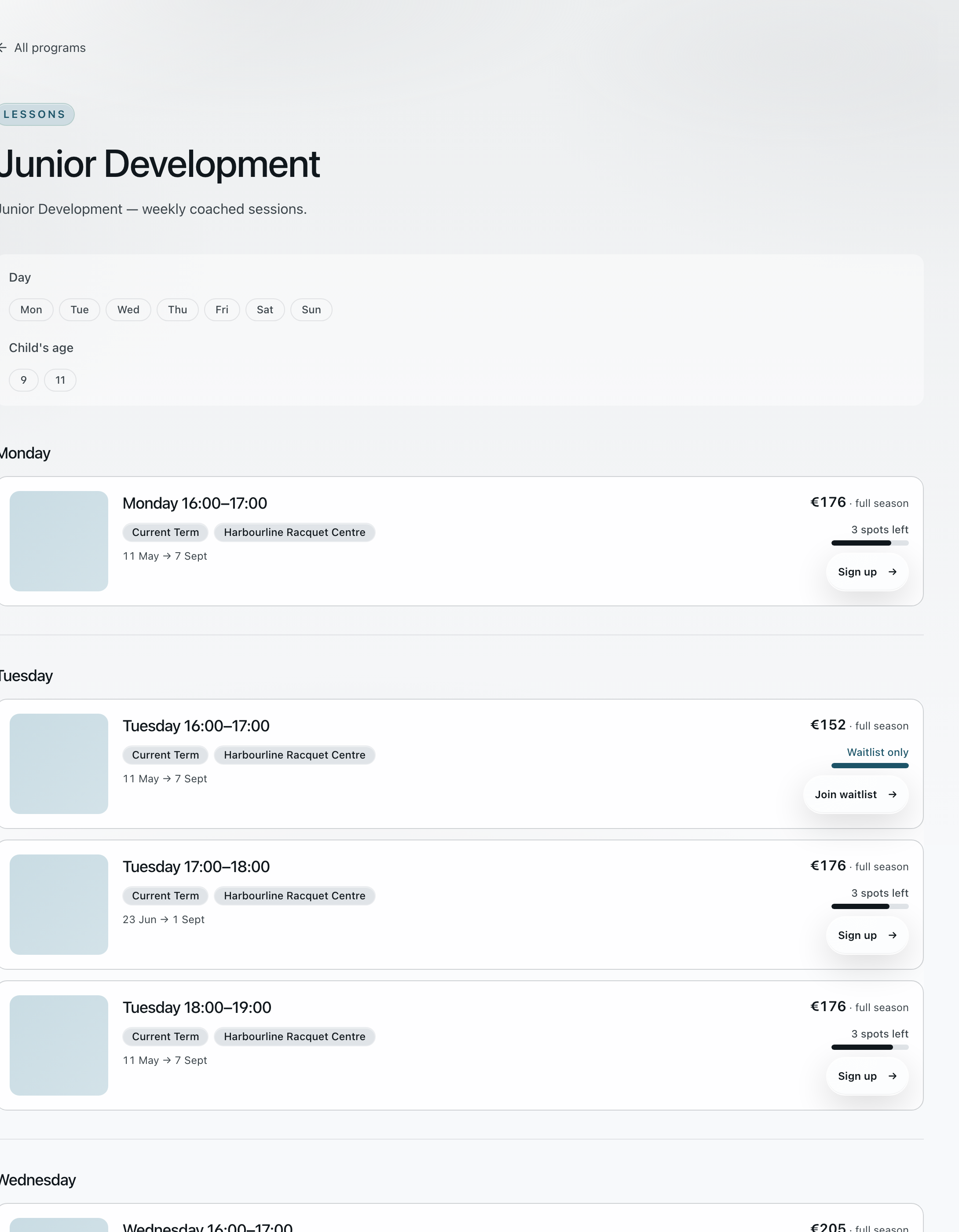
Filtering by day and by the child’s age leaves the groups that actually fit. Each one shows its full-season price and either the places left or a waitlist.
The class started in May. Academy strikes through the fourteen sessions already played, charges for the four still ahead and applies the household’s €15 credit before anyone accepts the terms.
The class thread comes with the place. The coach is named at the top, and this week’s session asks who is coming — on iPhone, Android or the web.
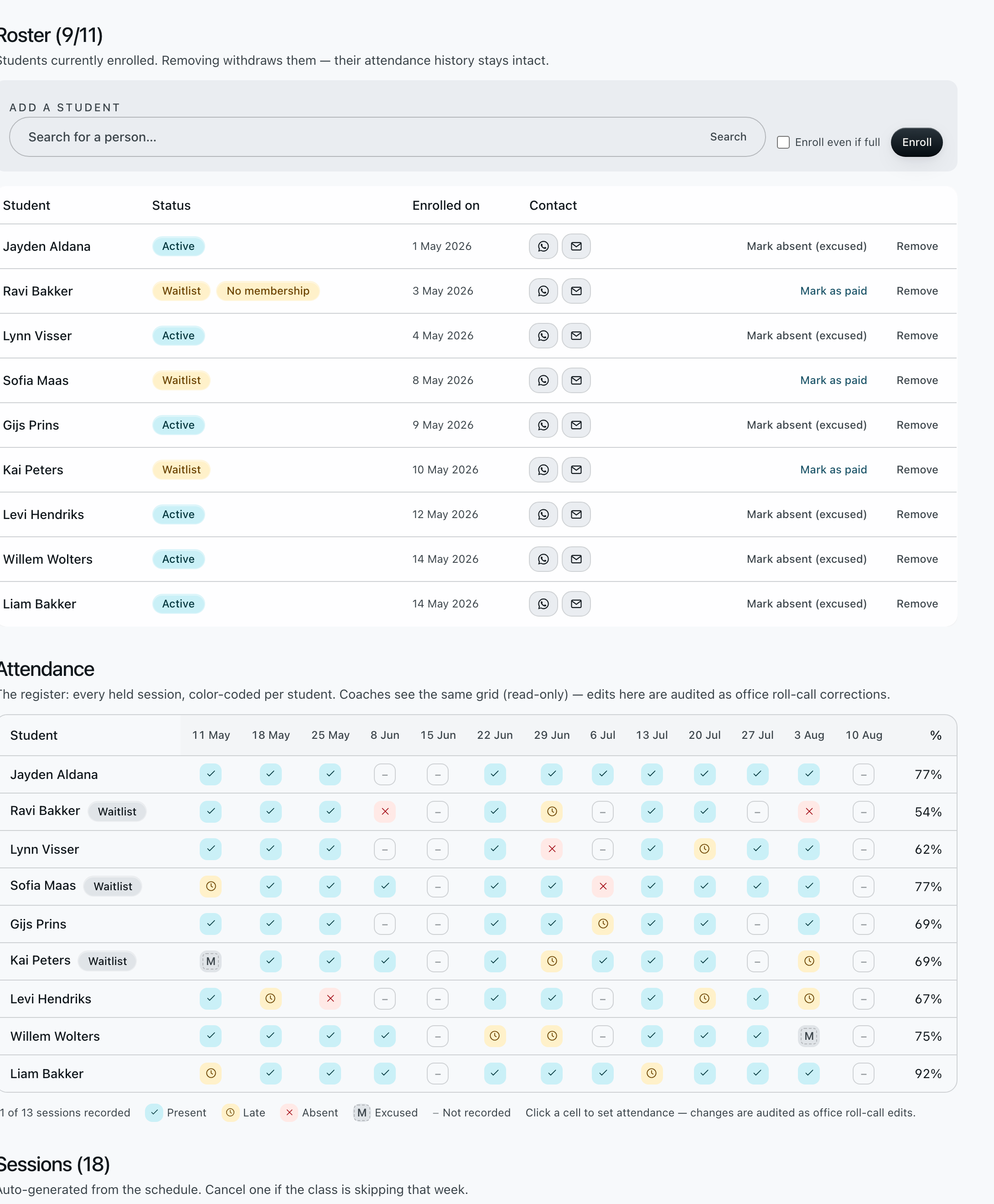
Every sign-up lands in the office roster with the date it happened, whether the place is active or waitlisted, and whether it has been paid.
1 / 4 · choose a view
Exhibit B · Academy workflow · demo club
The household sees the four remaining sessions and the €39.08 total before it confirms the terms.
02 The sick coach · coach → office → coach
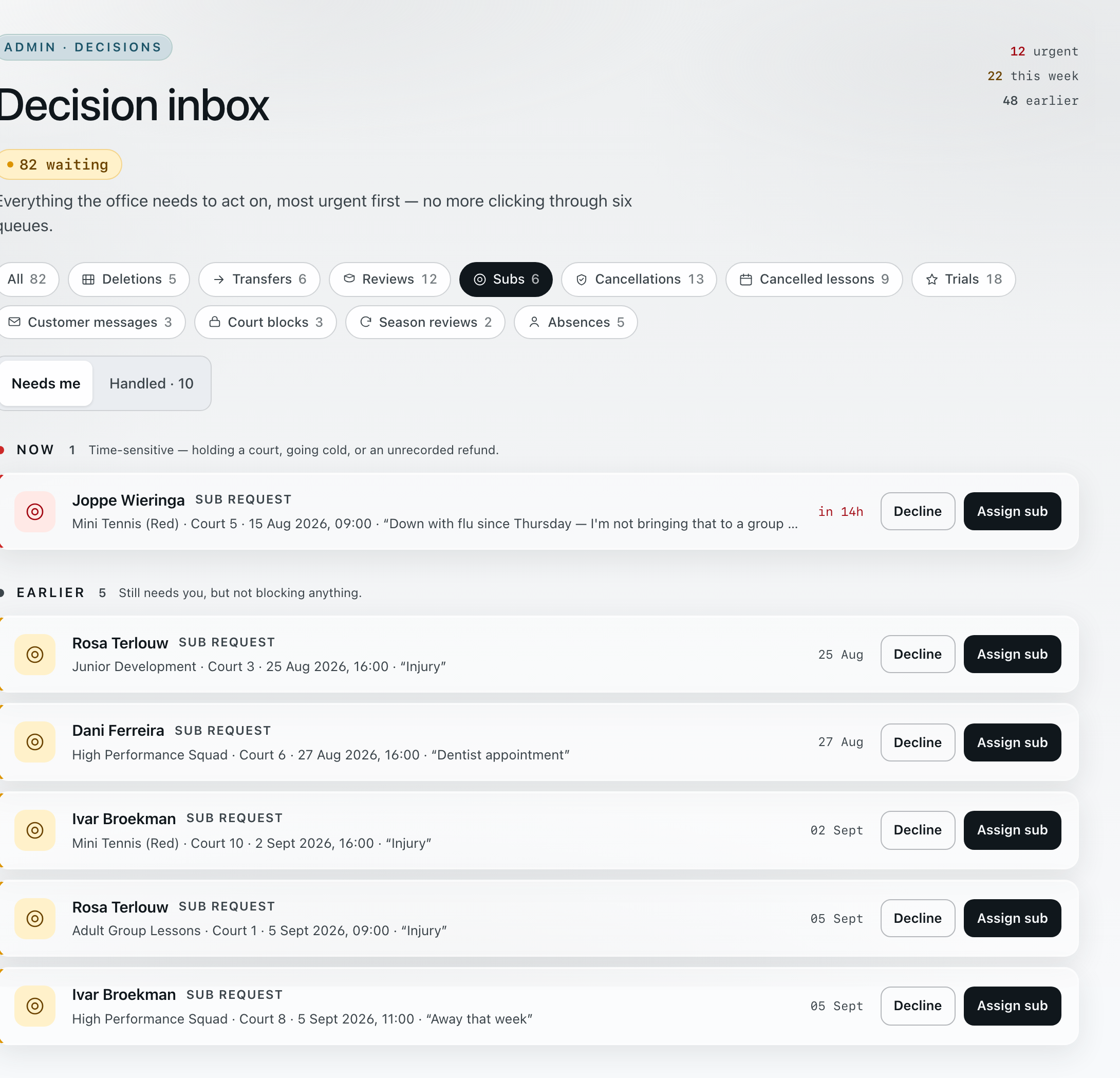
Joppe reports ill for Saturday’s Mini Tennis. The office sees the session, the court, the countdown and his own words together, picks a coach who is actually free, and the cover lands on her calendar.
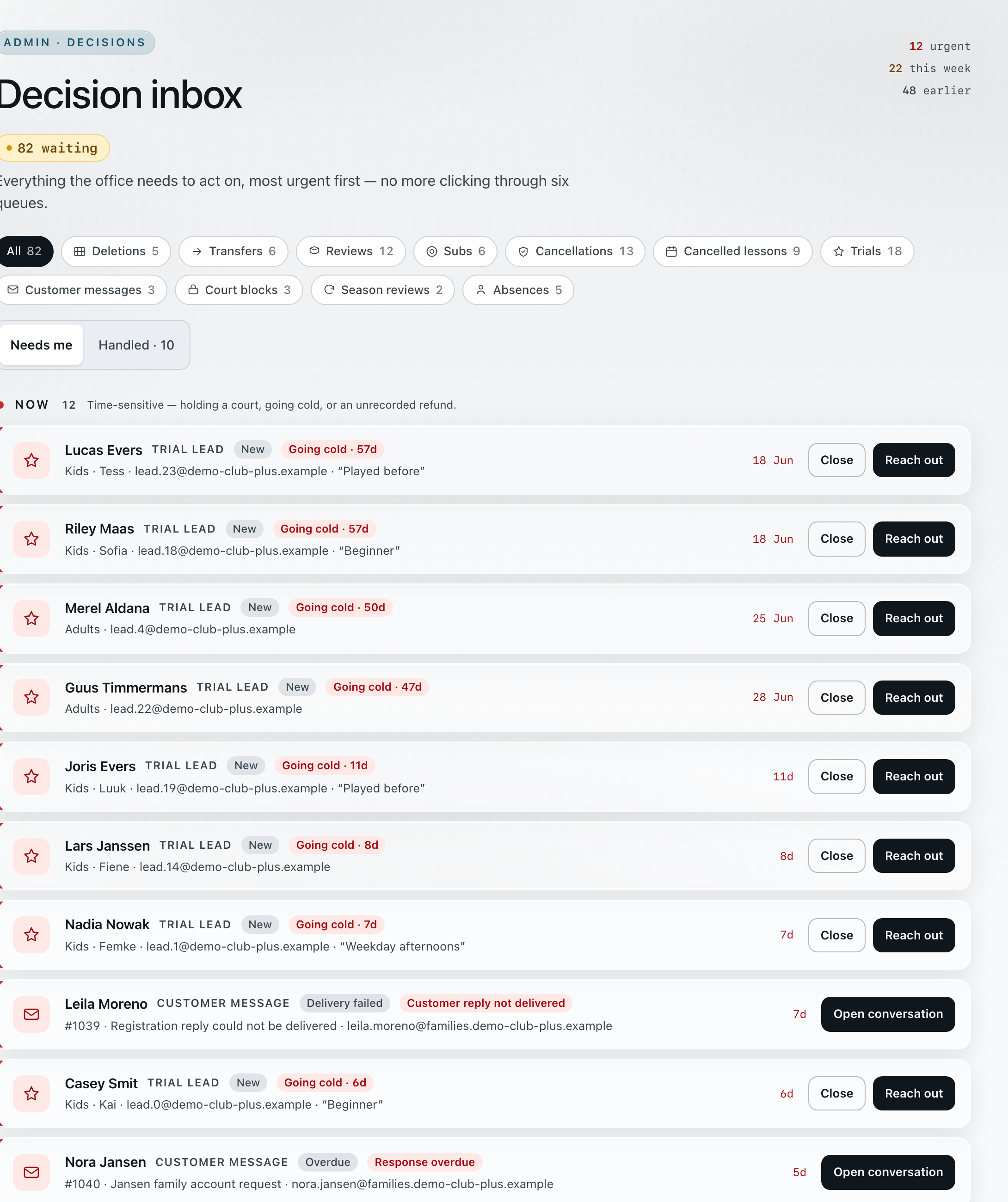
Time-sensitive requests sort themselves to the top.
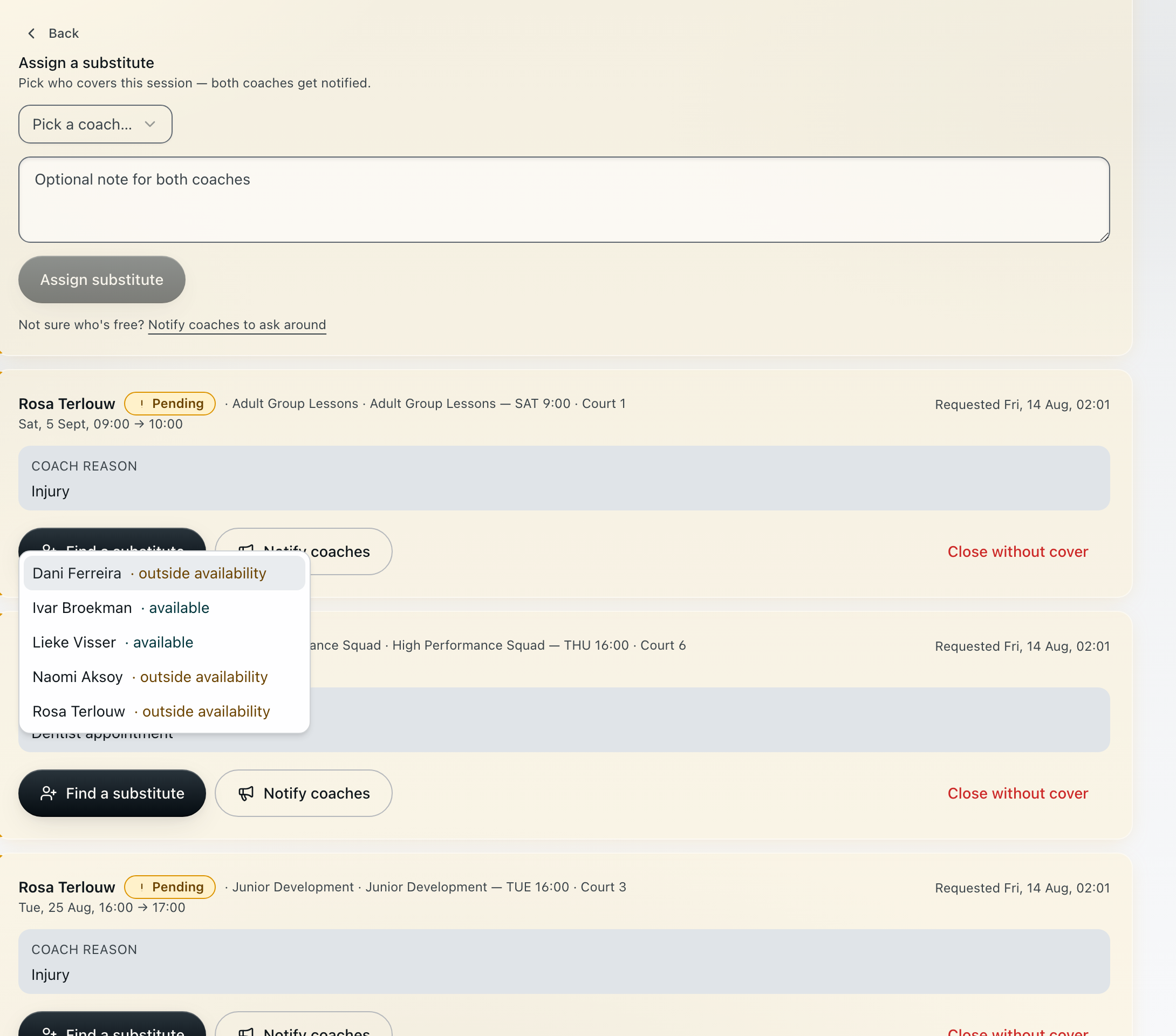
Assign a substitute
Pick who covers this session — both coaches get notified.
Pick a coach…
Every waiting request keeps the coach’s own reason on screen.
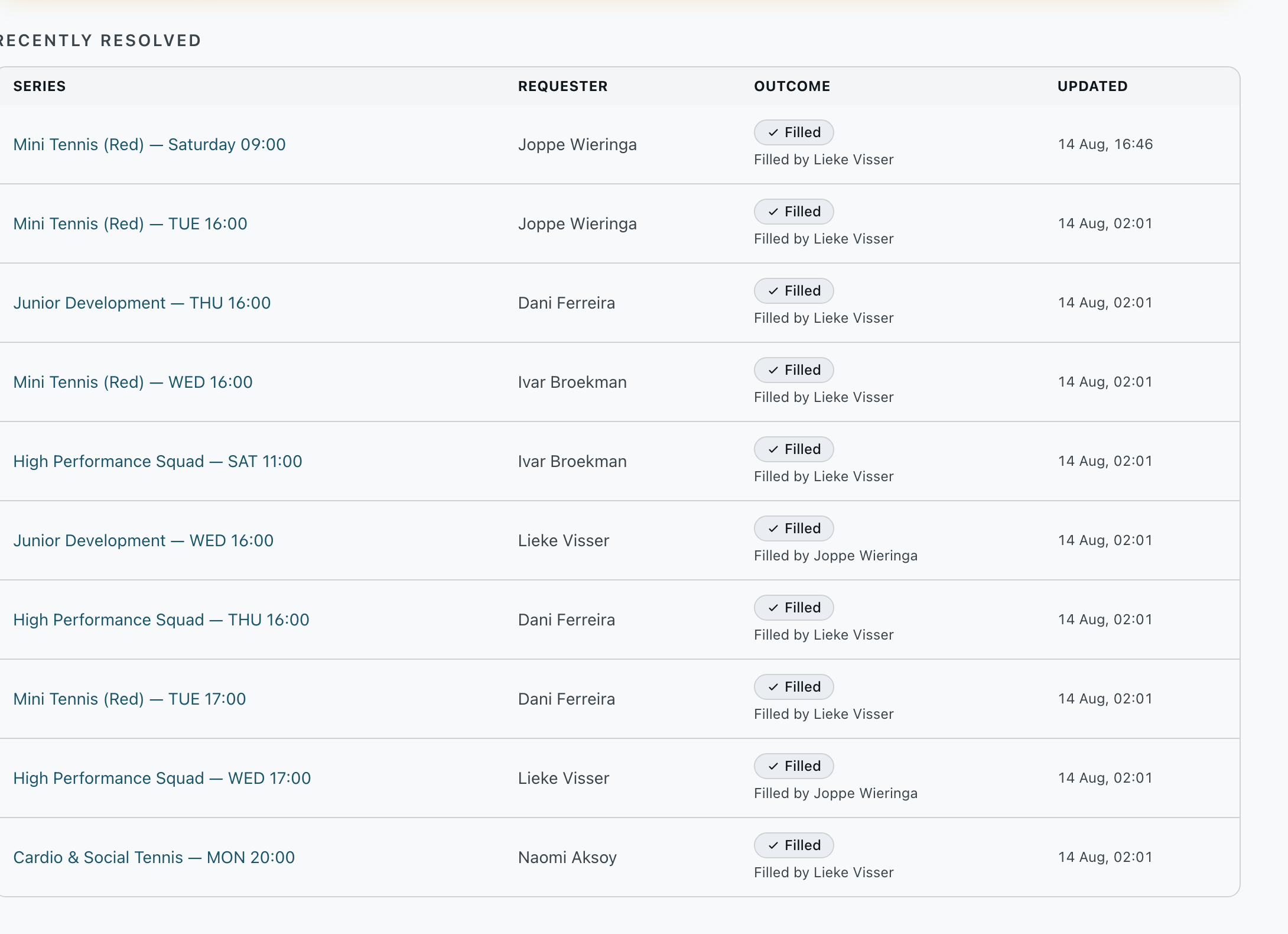
Requested by Joppe Wieringa · filled by Lieke Visser.
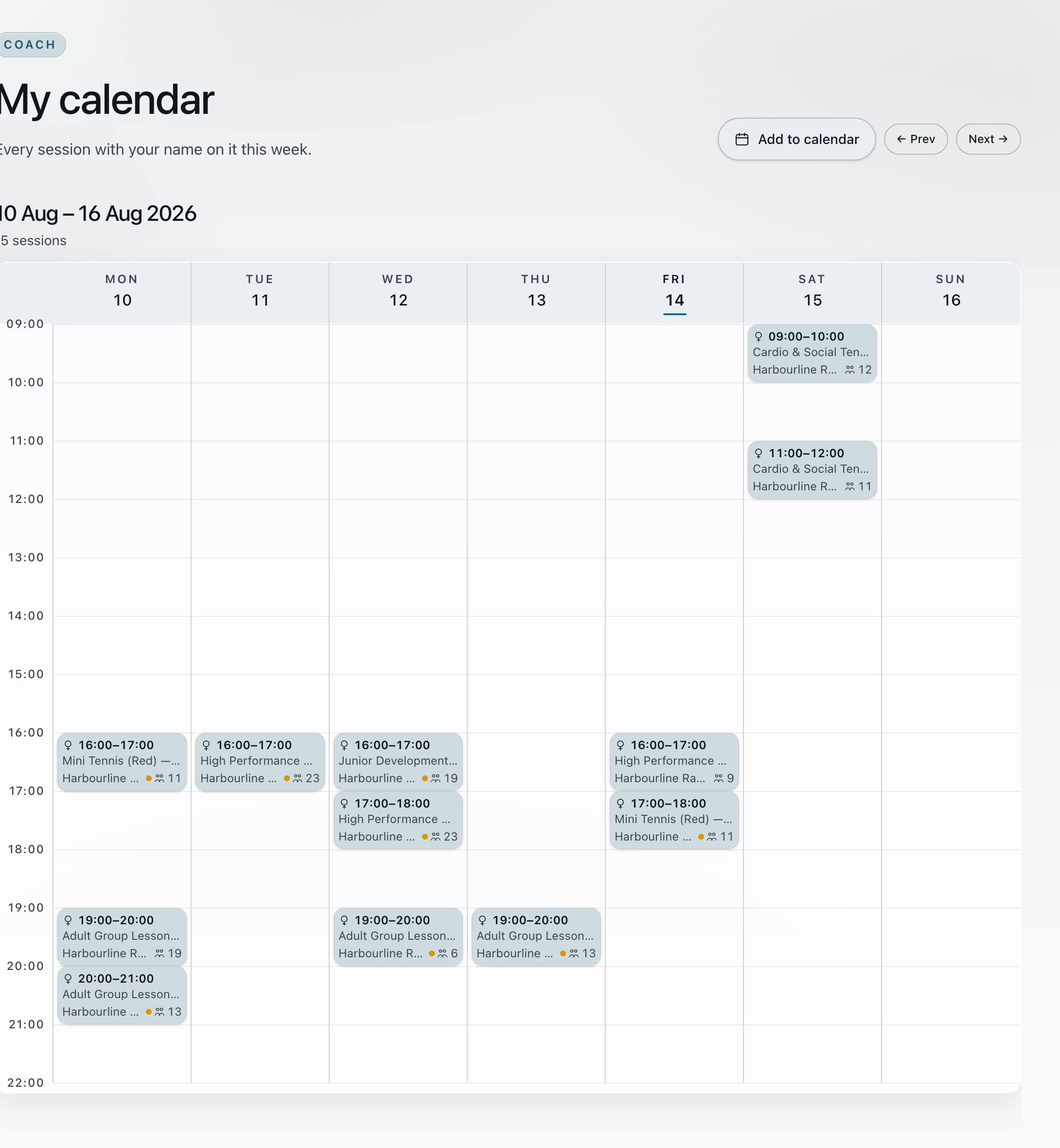
10 Aug – 16 Aug 2026 · every session with your name on it
The cover arrives with the rest of her week.
Joppe’s Saturday session goes to the top of the inbox under NOW, with the court, the date and how long the office has left to answer.
The coach’s own reason stays on screen while the office chooses. Every coach in the list is marked available or outside availability, so nobody is assigned into a clash.
The settled cover drops into Recently resolved: the series, who asked, who filled it and when. The pending ones stay in the queue above it until they are answered too.
The coach who took it sees the session in her own week, alongside the fourteen she already had, with the time, the class and the headcount.
1 / 4 · choose a view
Exhibit C · Academy workflow · Harbourline Racquet Centre (demonstration organization)
If nobody can cover, the request stays open in the queue rather than quietly disappearing.
03 The transfer · household → office → household
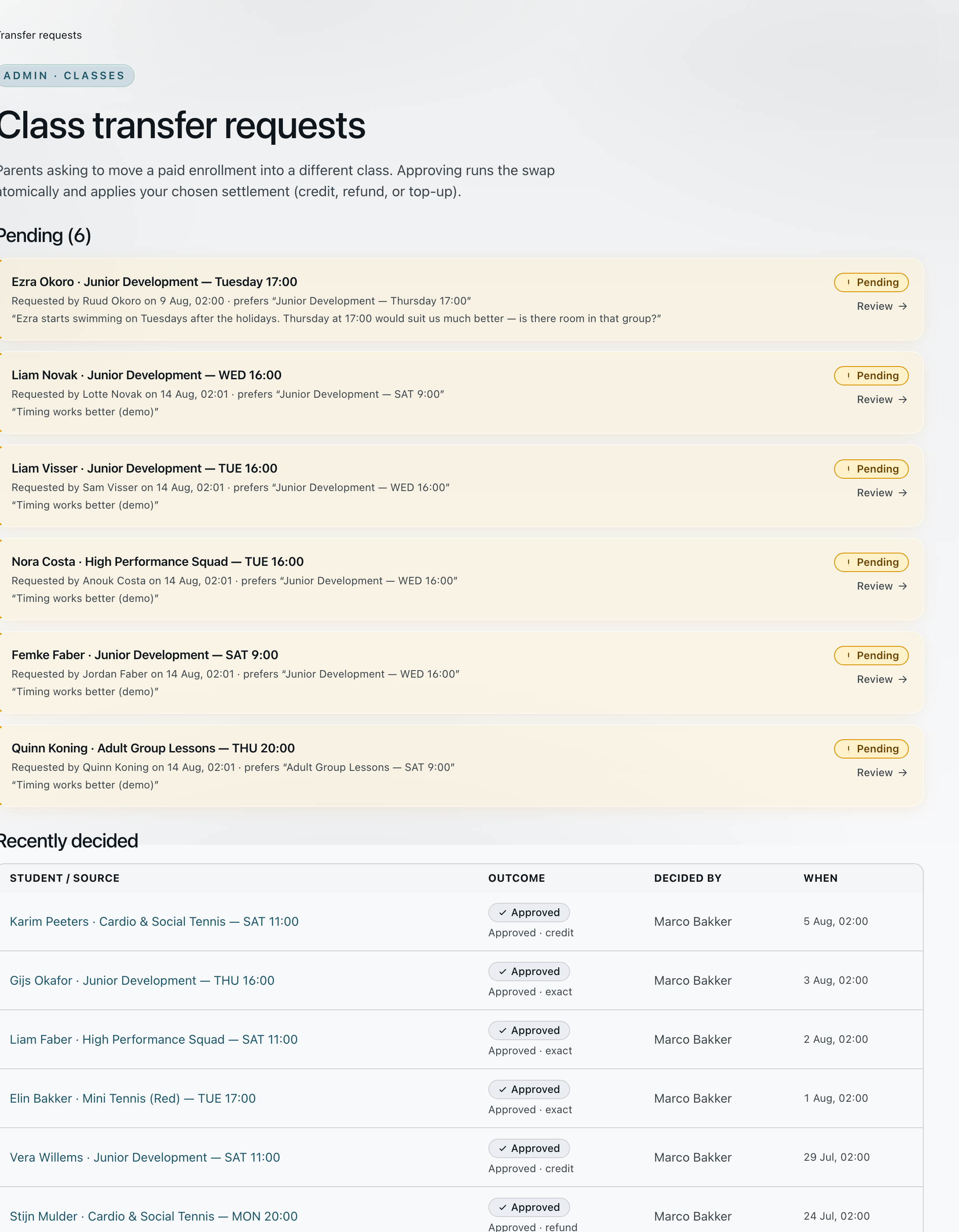
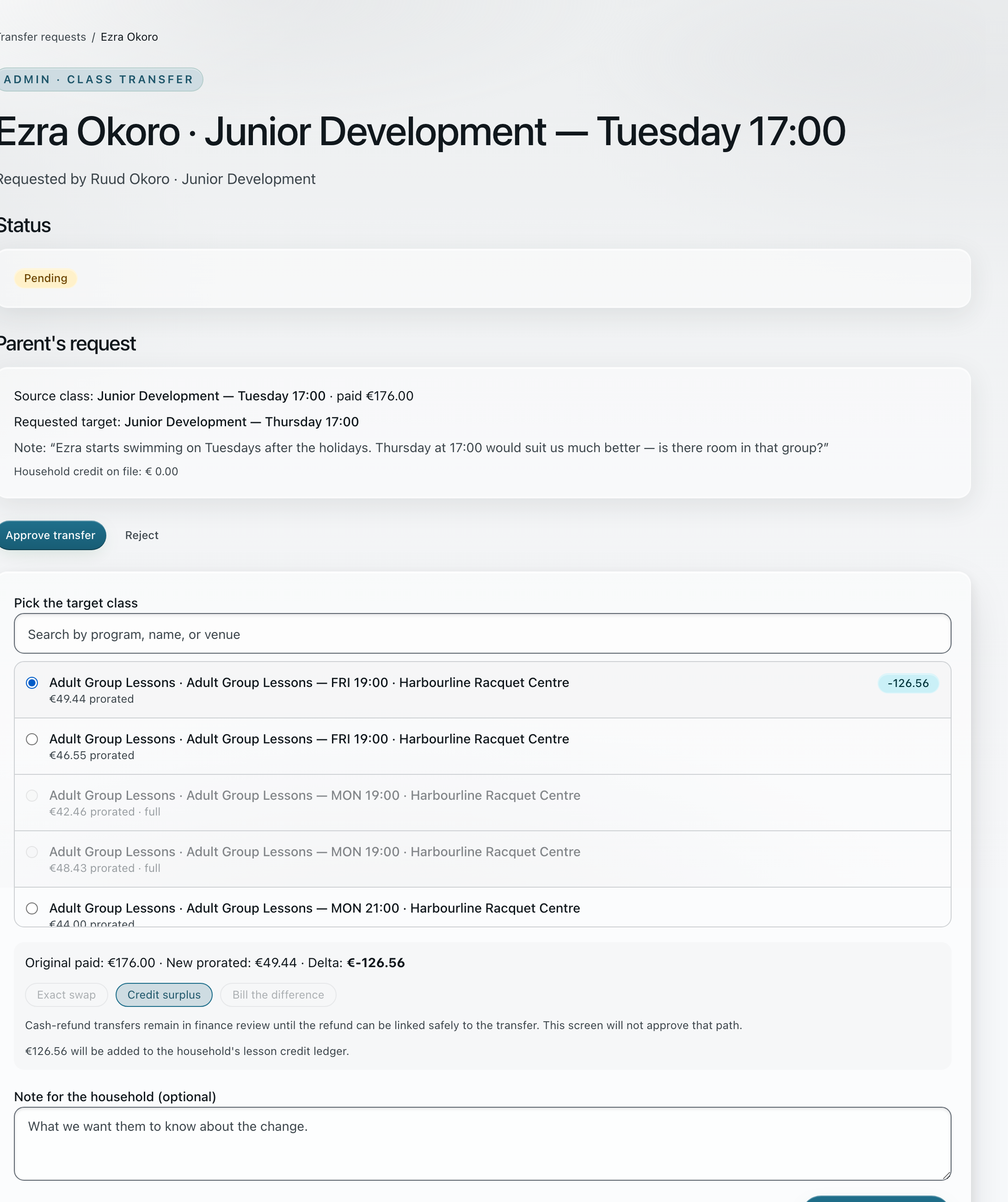
A parent asks to move his son out of the Tuesday group and says why. The office sees the paid class, the requested class and what the price difference does to the money — before approving anything.
Tuesday 17:00 → Thursday 17:00
“Ezra starts swimming on Tuesdays after the holidays. Thursday at 17:00 would suit us much better.”
Requested by Ruud Okoro · 9 Aug.
One swap, one settlement
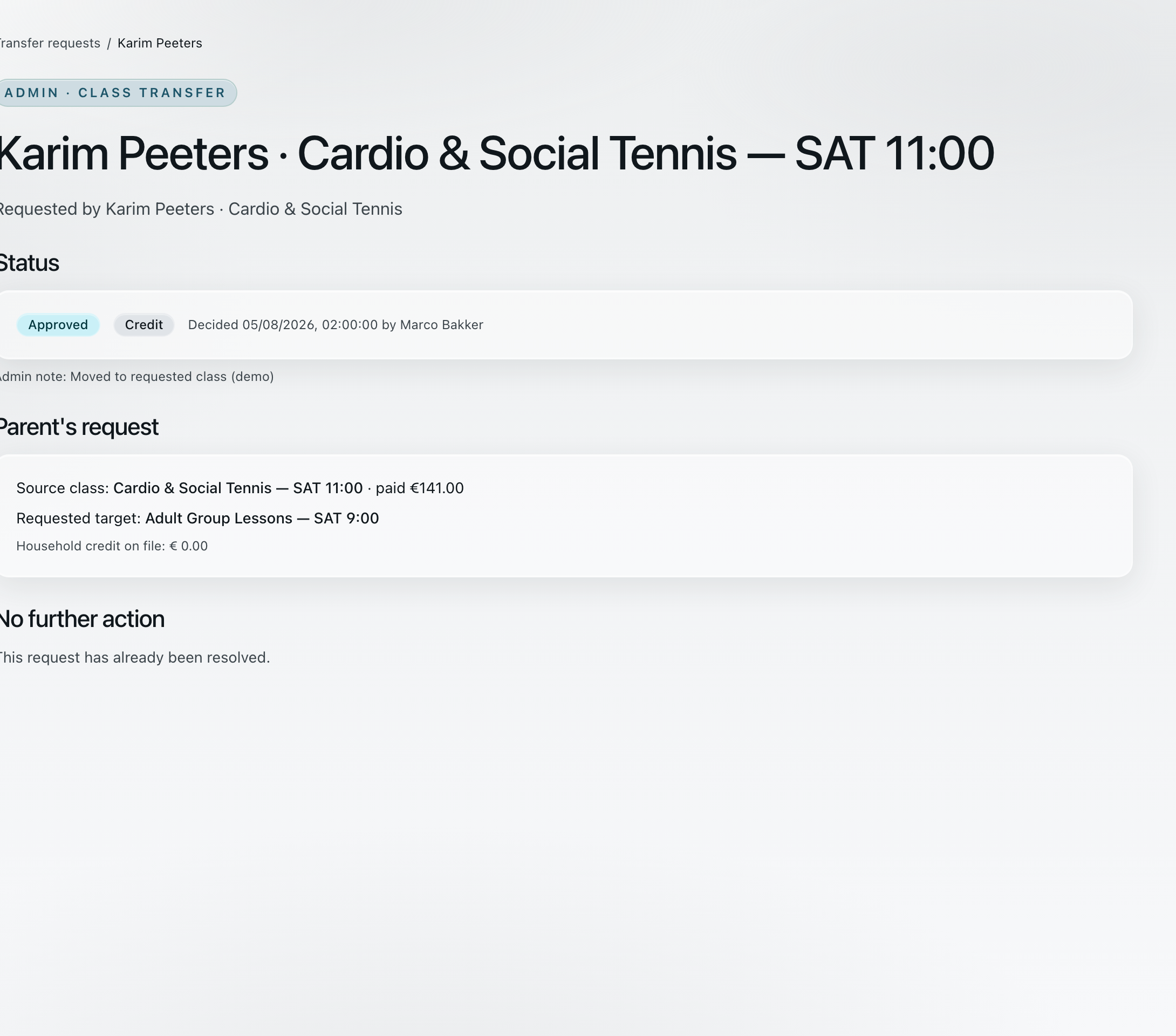
Decided 5 Aug, 02:00 by the office, with the note kept on the record.
Source class, target class and the household credit on file all stay with it. No further action.
The queue holds the child, the class already paid for, the class the parent wants and the sentence explaining why — here, swimming lessons starting on Tuesdays.
Full groups are greyed out, so the office can only pick a class with room. Academy prorates the new place, shows the difference against what was paid, and asks how to settle it.
Approved, settled as credit, with the name of whoever decided it and the time. The record answers the question later without anyone reconstructing it.
1 / 3 · choose a view
Exhibit D · Academy workflow · Harbourline Racquet Centre (demonstration organization)
A cash refund stays in finance review until it can be linked safely to the transfer — this screen will not approve that path.
04 The rained-out Saturday · office → households
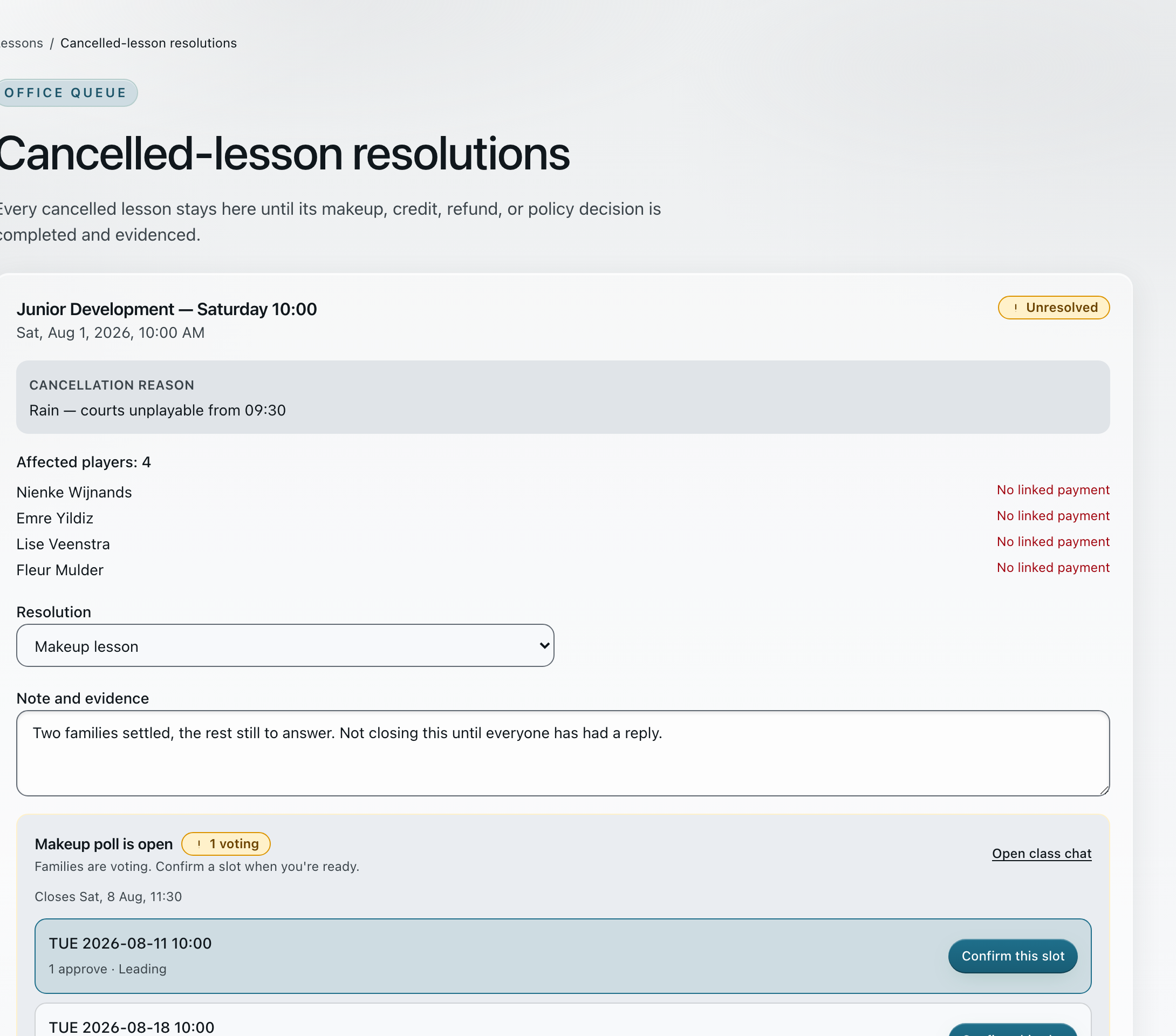
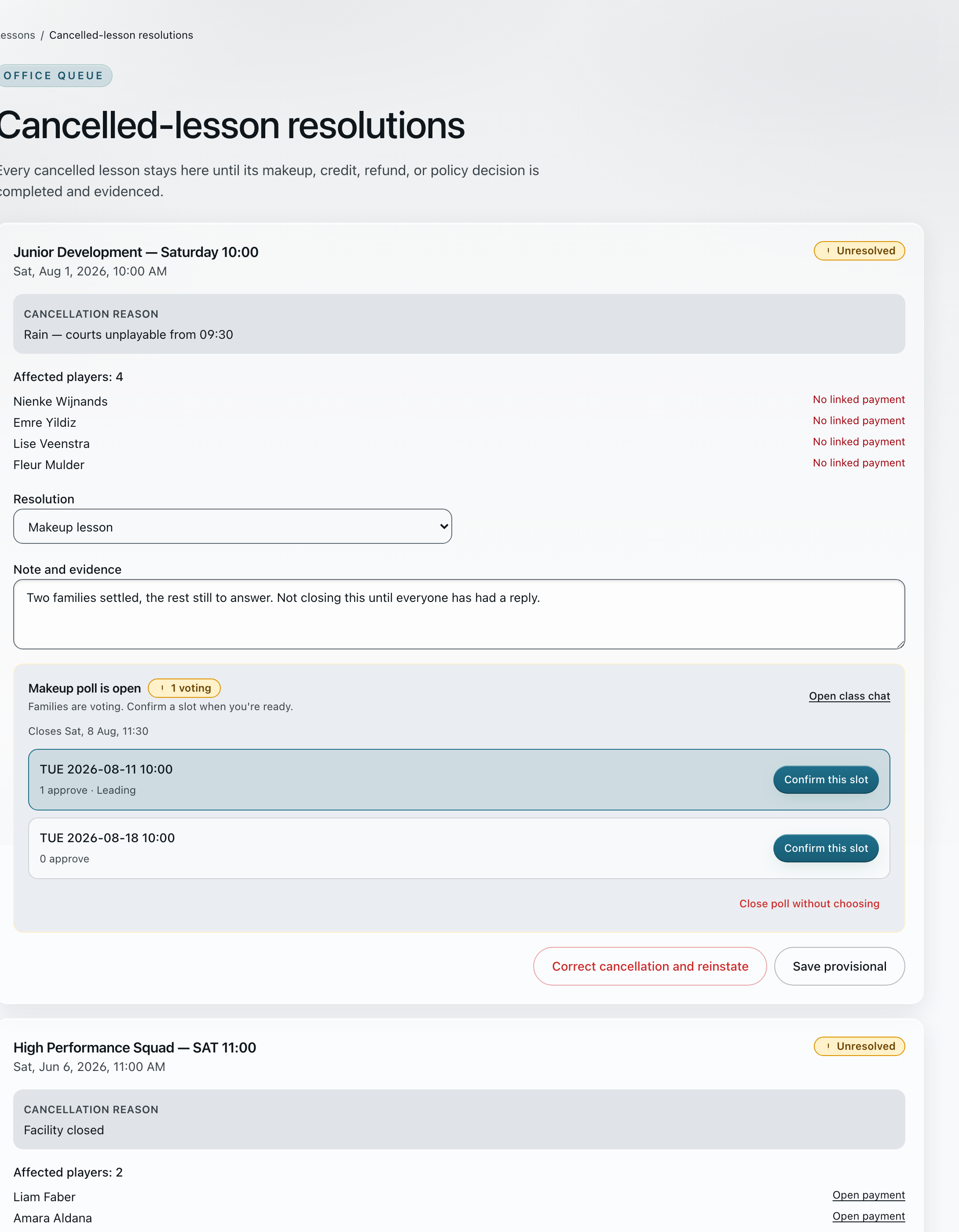
Cancelling opens a case that names the reason and every affected player. It stays in the office queue — with the makeup poll, the credit or the club’s policy — until each of them has an answer on the record.
Cancellation reasonRain — courts unplayable from 09:30
Affected players: 4
Makeup poll open · families confirm a slot.
Makeup, one step at a time
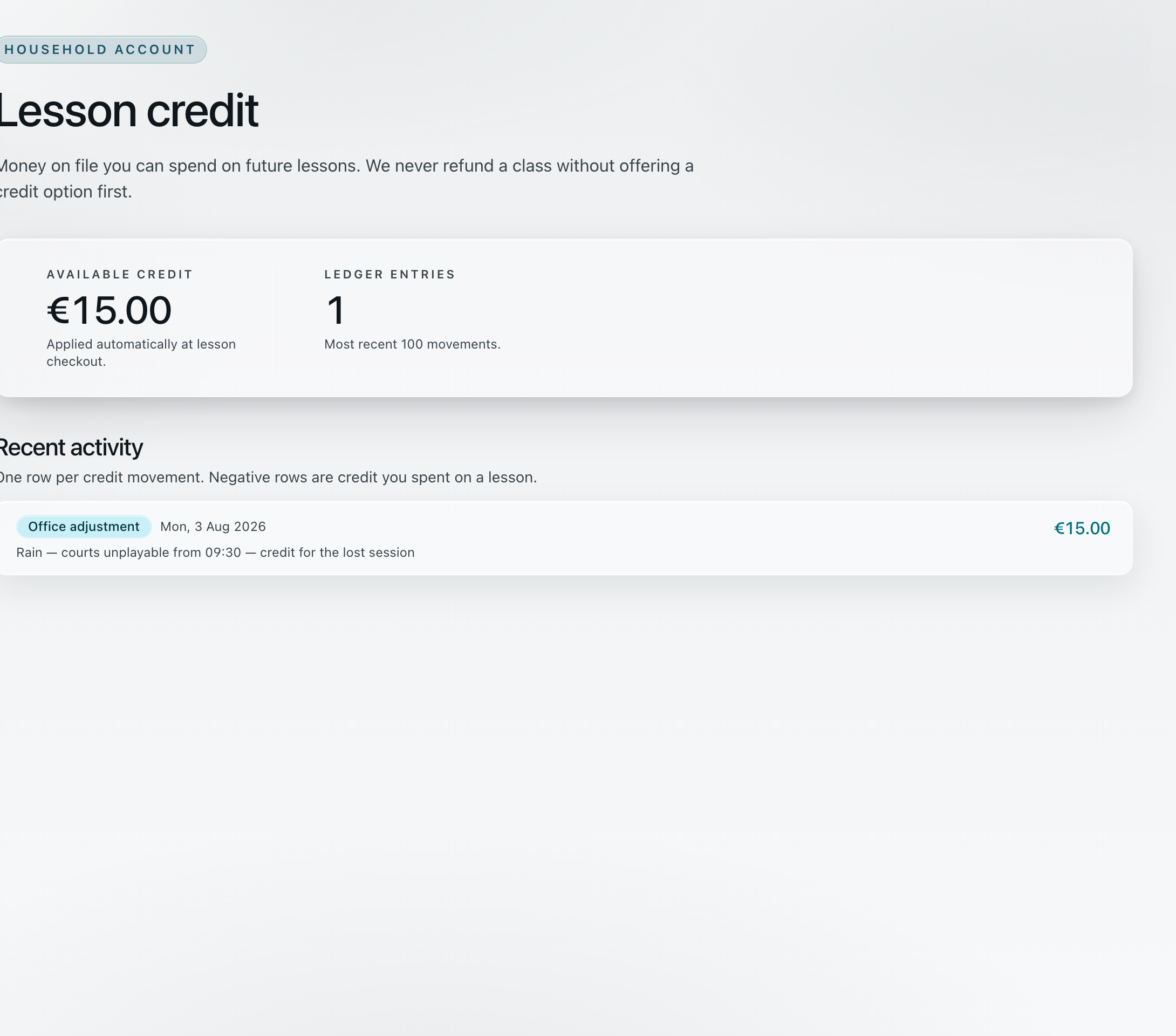
€15.00
Applied automatically at lesson checkout.
Rain — courts unplayable from 09:30 — credit for the lost session
One row per credit movement.
The session, the reason and all four affected players sit in one unresolved case. The note field records what was agreed while the class votes on a replacement date.
Every other cancelled lesson waits in the same place, each still holding its reason, its players and the route the office has to pick: attach a lesson, schedule a new slot, or ask the class.
Where the answer is credit, it lands on the household account as one ledger row that names the rained-off session — spendable at the next checkout.
1 / 3 · choose a view
Exhibit E · Academy workflow · Harbourline Racquet Centre (demonstration organization)
The credit or refund stays on that enrollment and on the family’s statement.
05 The roll call · coach → office → household
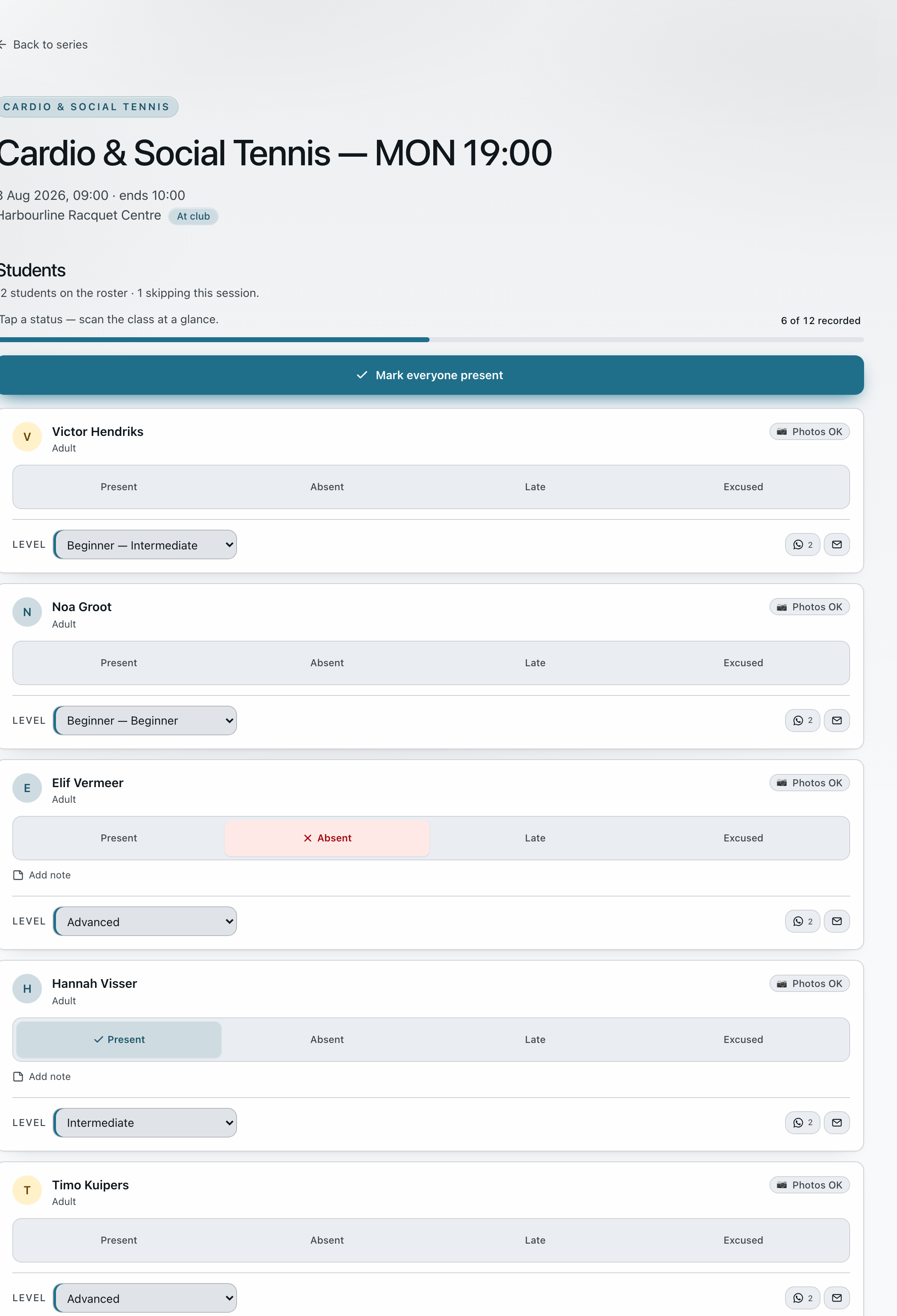
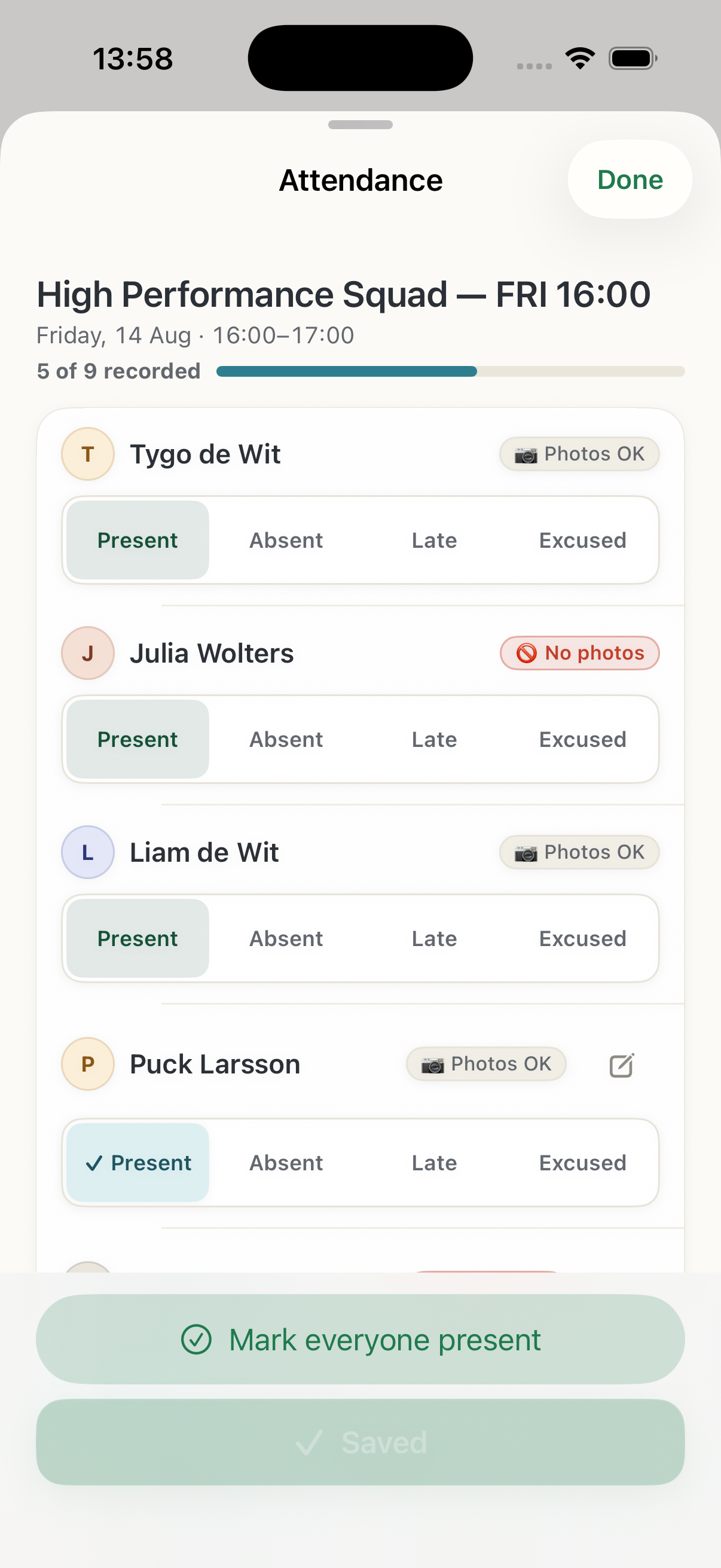
One button marks the whole group present; anyone late, absent or excused is one tap after that. The office register fills in while the coach works, and the household sees the same lessons at home.
12 on the roster · 1 skipping this session.
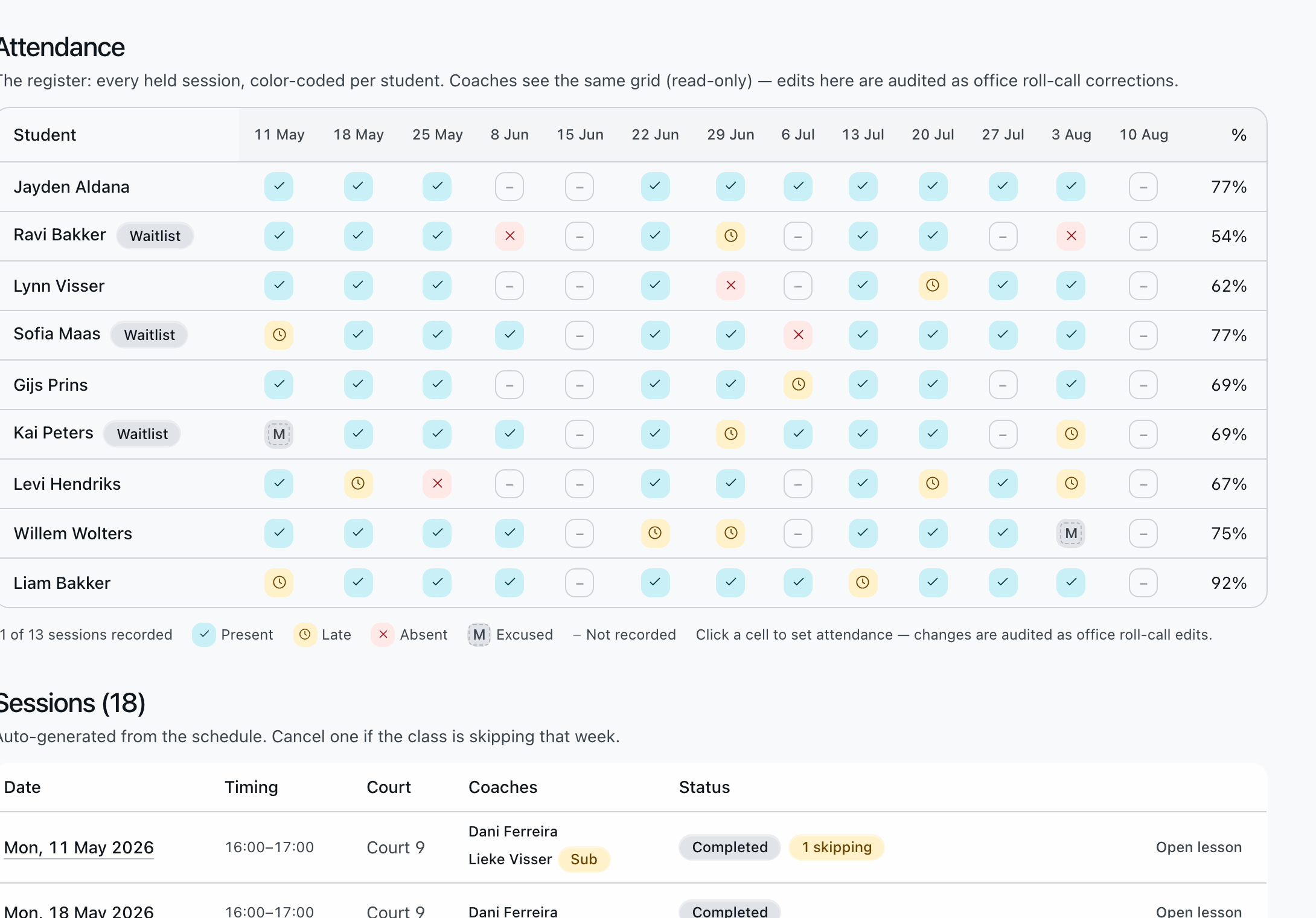
Every held session, colour-coded per student.
Changes are audited as office roll-call edits.
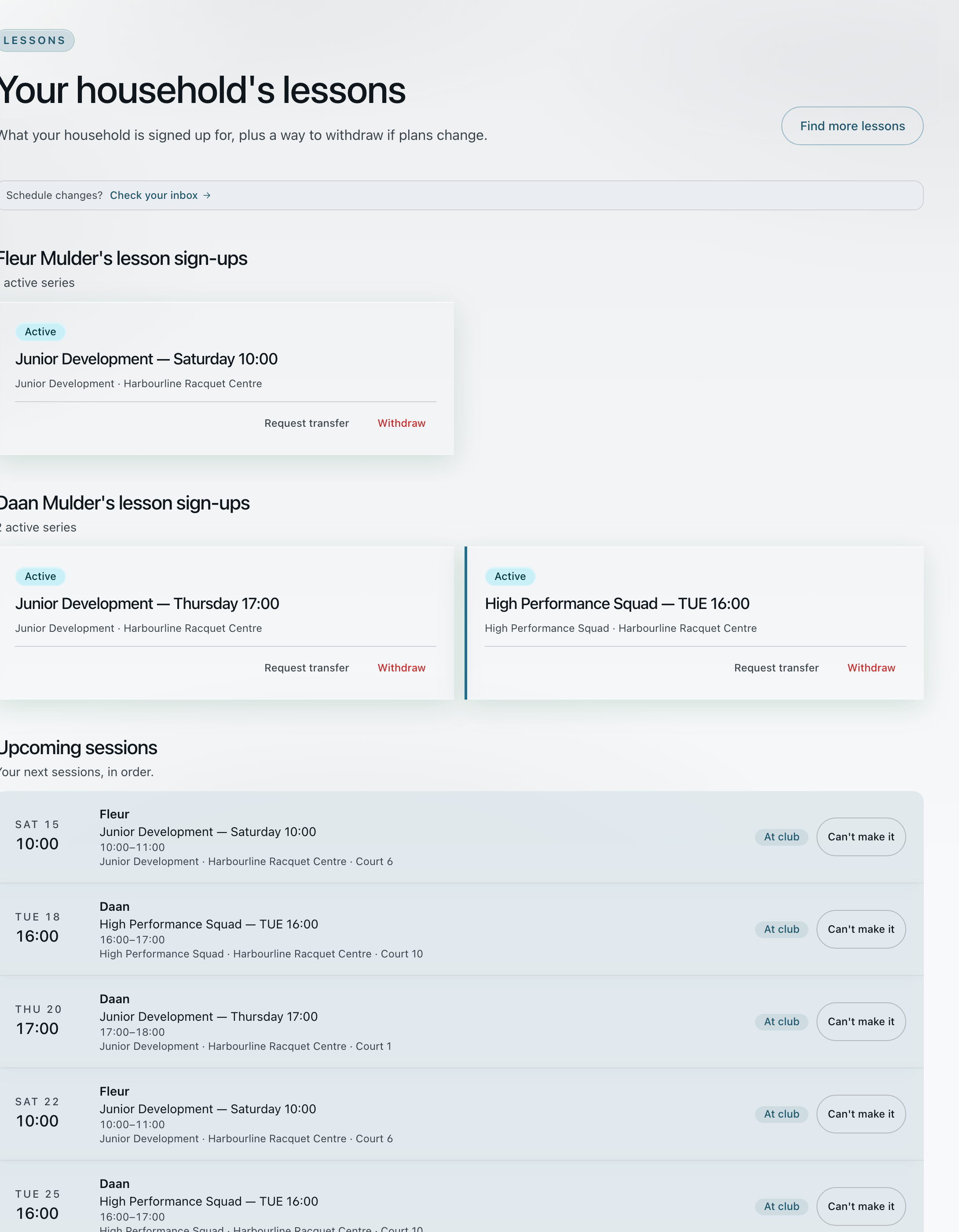
Junior Development — Saturday 10:00
Harbourline Racquet Centre · request transfer · withdraw
High Performance Squad — TUE 16:00
Harbourline Racquet Centre · request transfer · withdraw
One page per household, whatever each child does.
One button marks everyone present, and the bar shows how much of the group is recorded. Absent, late and excused are a single tap each, with room for a note.
The same marks build one grid: every student against every held session, with an attendance percentage. Later corrections are audited as office roll-call edits.
At home, each child’s active series is listed with its club and venue — and the household can ask for a transfer or withdraw from the same place.
1 / 3 · choose a view
Exhibit F · Academy workflow · Harbourline Racquet Centre (demonstration organization)
Coaches can take the same register on iPhone, Android or mobile web.
03 · Roles
The office
Runs the schedule, handles requests, follows attendance and keeps payments connected to the right household.
The coach
Calendar, roster, roll call and session updates carried to the court on a phone.
The household
Schedule, enrollment, per-child consent, receipts and the class thread, with each child’s own details kept together.
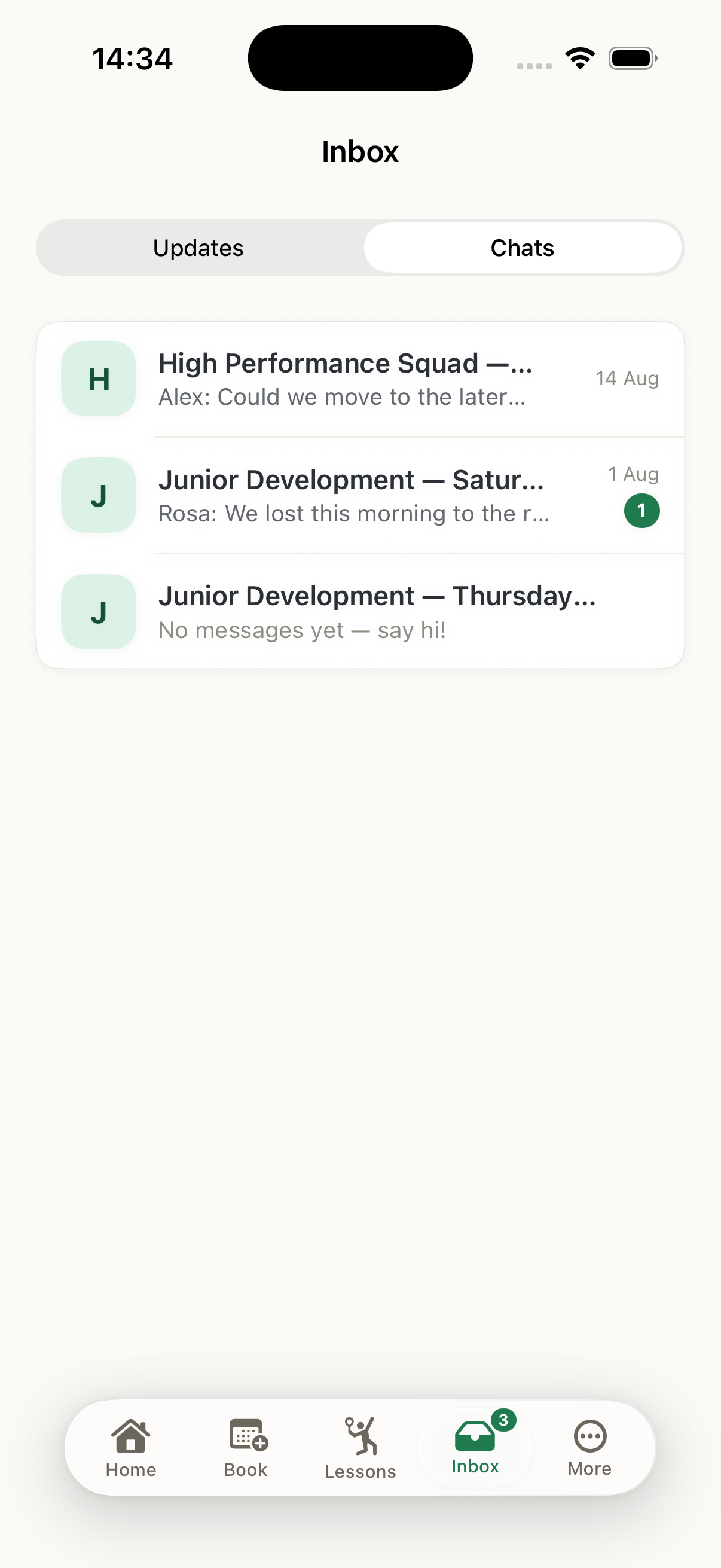
iPhone and Android
An office update appears in the coach and household view without anyone copying it into a message or second calendar. Academy includes native iOS and Android apps alongside the browser.
04 · Plans for one location or many
Create the club, add locations and courts, invite the team and connect payments. Core fits a smaller club, Plus adds room for more courts, coaches and players along with the public join page and the lead workbench, and Complete adds unlimited contracted locations, staff roles and the front desk.
Choose by locations, courts, coaches, participants and the schedule views your office needs.
Your Academy setup
Add your clubclub name · locations · contact details
Add the places and programslocations · courts · programs · policies
Invite your teamcoaches · office roles · permissions
Check each viewowner · coach · household
Connect paymentsclub Mollie account · customer terms
Start the weekpublish schedules · invite households
What each plan looks like
05 · Academy Managed · inquiry from €499 / month
Tell us how many locations and records you need to move, and how much setup, training and support your team wants. We then quote the move and the training. We bring the people, the families they belong to and their logins across first, then set up classes and schedules with your team.
Set up seasons, programs, courts, policies and pricing with the office.
We bring across the people you agreed, the families they belong to and their logins, and the office checks them with us before anyone signs in.
Train the office and coaches, with an agreed support period after setup.
06 · Payments and ownership
Member and household payments go into the club’s own Mollie account, under the club’s own contract with Mollie. Your Academy subscription is a separate bill, from us to you.
Lessons, camps, memberships and household dues settle to the club’s connected Mollie account, under the club’s own contract with Mollie.
We invoice the club for Academy each month, on its own bill, apart from anything a member pays you.
Download a household’s statement, its consent records, the corrections and the full export. The Mollie account is in your club’s name and the records are yours.
Paying at the desk works the same way. The front desk register takes cash and card at the counter, counts the drawer at closing by payment method and source, and exports the VAT for the day or the week. The front desk is part of Academy Complete — see how the desk works.

07 · Built from the court
Academy grew from coaching across clubs in The Hague and Amsterdam: sign-ups, lesson groups, parent messages, courts and payment records all needing to line up in the same busy week.
That is why the demo is 45 minutes inside Academy, running one of your own weeks.
08 · FAQ
Core starts at €99 a month plus VAT. You can create your club directly from the plan that fits—or book a working session and we’ll map your club, select the plan and define onboarding.
Start Core is €99 per month plus VAT for one location, up to four courts, three coaches and 150 active participants. Start Plus is €199 for one location, up to ten courts, six coaches and 500 active participants, and adds the public join page, the lead workbench and conflict and workload views. Academy Complete is €349 for unlimited contracted locations, participants, coaches and courts, with staff roles and the front desk. Academy Managed begins from €499 per month, with setup, migration and final scope quoted separately.
Your club does. Member and household payments settle into the club’s own Mollie account, under your own contract with Mollie. Your Academy subscription is a separate bill, from us to you.
No. Academy works in the browser, and there are native iOS and Android apps for people who prefer them. An office update appears in the coach and household views either way.
For Managed onboarding, we agree which people, household relationships and accounts to import. Academy also provides exports for your team, including a per-subject data export and an anonymisation workflow.
Children sit inside a household with per-child consent records, including explicit photo and progress-sharing choices visible to the relevant coach. Consent records and an audit log are in every plan.
Academy publishes the Data Processing Agreement, the business subscription terms and the service privacy notice at permanent versioned URLs on app.contaktacademy.com/legal. The subprocessors are Render, Supabase, Mollie, Resend and Upstash.
Start your club or program from €99 a month—or choose a coach absence, class transfer or cancelled lesson and we’ll run your exact case through Academy together.