
Front desk
The front desk finally counts.
A drink, a can of balls, a guest fee, a cash court. The desk is where a club’s money is loosest — small amounts, taken fast, remembered badly. Academy gives the desk a register, and every sale lands next to the lesson, the member and the payment it belongs to.
A screen of buttons for everything the club sells.
The office builds the catalogue once: drinks, balls, grips, guest fees, whatever the club sells. Each item carries its own VAT rate. The desk taps the item, takes the money and moves on — the sale is already attached to the day, the till and the person who rang it.
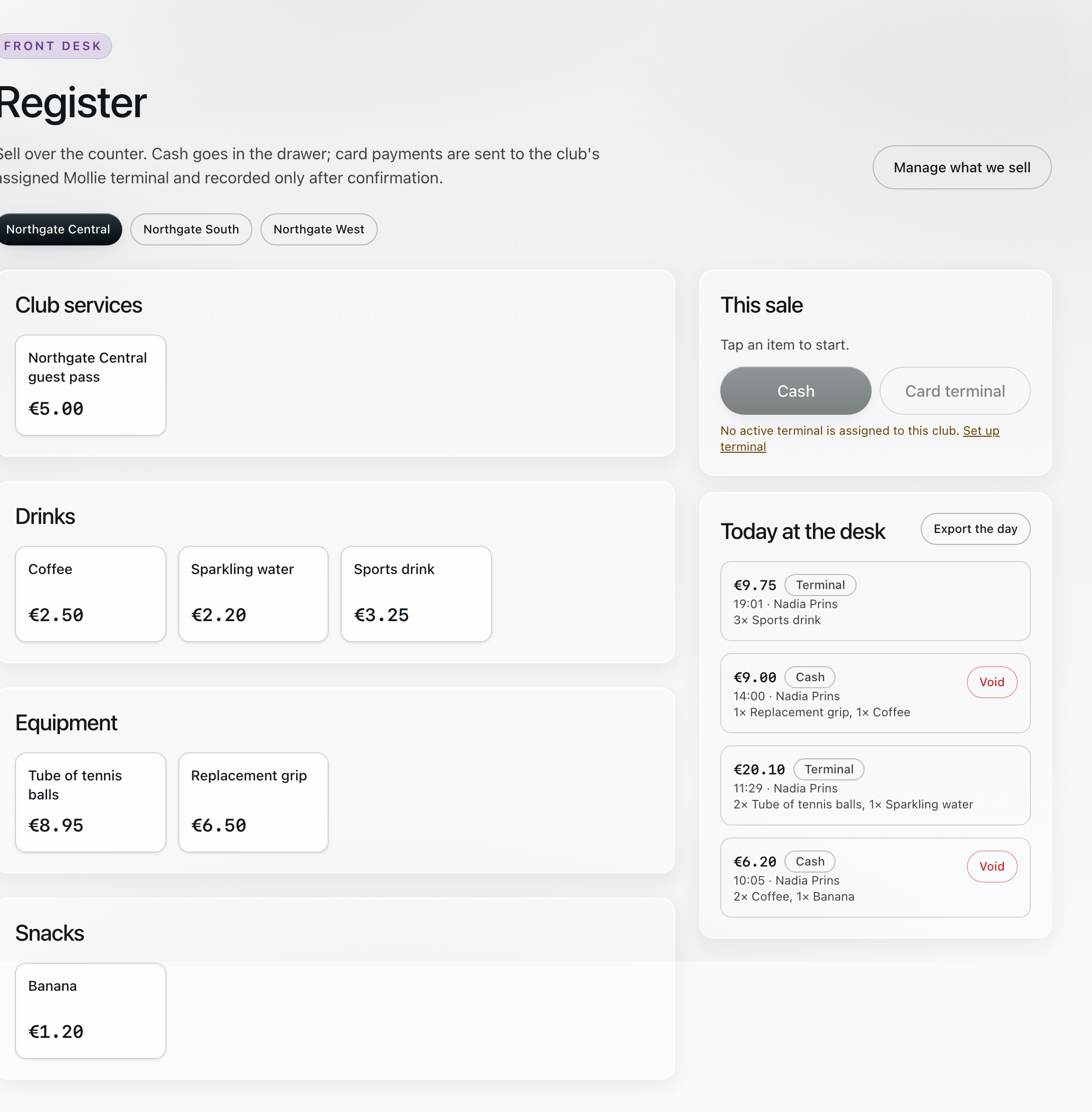
register · front desk · redrawn at phone scale
Register · Front deskNorthgate Central
Northgate Central guest pass€5.00Coffee€2.50Sports drink€3.25Tube of tennis balls€8.95
This saleTap an item to start.CashCard terminal
TODAY AT THE DESK3 × Sports drink · terminal€9.75
1 × Replacement grip, 1 × Coffee · cash€9.00
The desk cannot mistype a price.
The office holds the prices and the VAT rates. The desk chooses what was sold; Academy works out what it costs and how much of it is tax. A price the office changes at four o’clock is the price the desk charges at four o’clock.
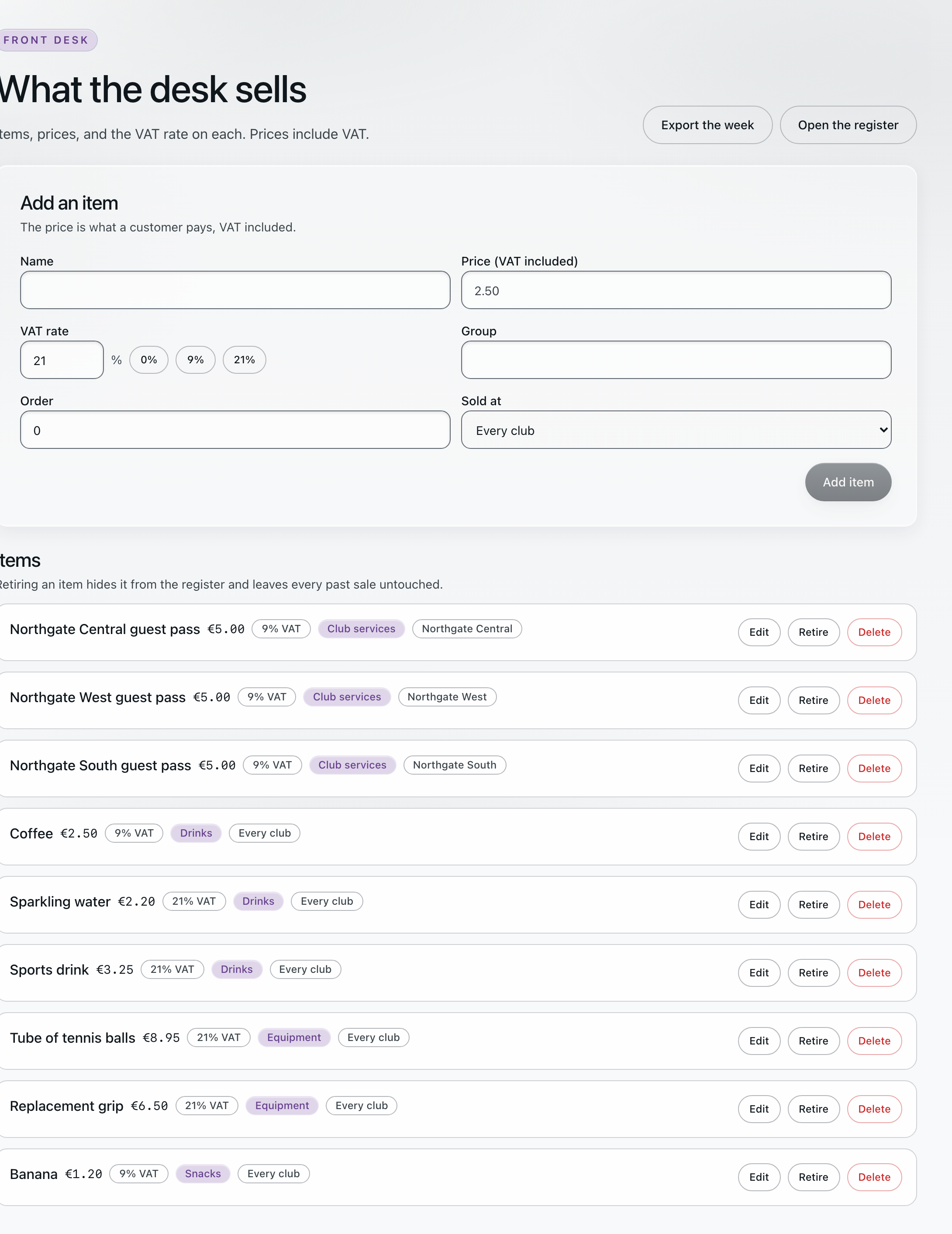
catalogue · VAT per item · redrawn at phone scale
What the desk sellsprices include VAT
Guest pass €5.009% VAT
Coffee €2.509% VAT
Tube of tennis balls €8.9521% VAT
Replacement grip €6.5021% VAT
Every sale remembers who rang it.
Who rang it, when, on which till, and against which member or household if there was one. That is what makes the drawer count add up at closing time, and what answers the member who queries a line on their account a week later.
Ways to pay
The money lands in the club’s own account.
Member and household payments settle to the club’s own Mollie account, and we take no percentage of them. No card number ever reaches us. The Academy subscription is a separate bill, from Contakt to the club.
Card payments run on the club’s own terminal
Card payments run on the club’s own Mollie terminal, against the open sale.
A refund is recorded against the sale it corrects, so the receipt and the refund stay together.
Close the day
One drawer count for the whole day.
Register sales, court hire and guest fees all land in the same cash-up. At closing time the desk counts the drawer once, against everything the day took.
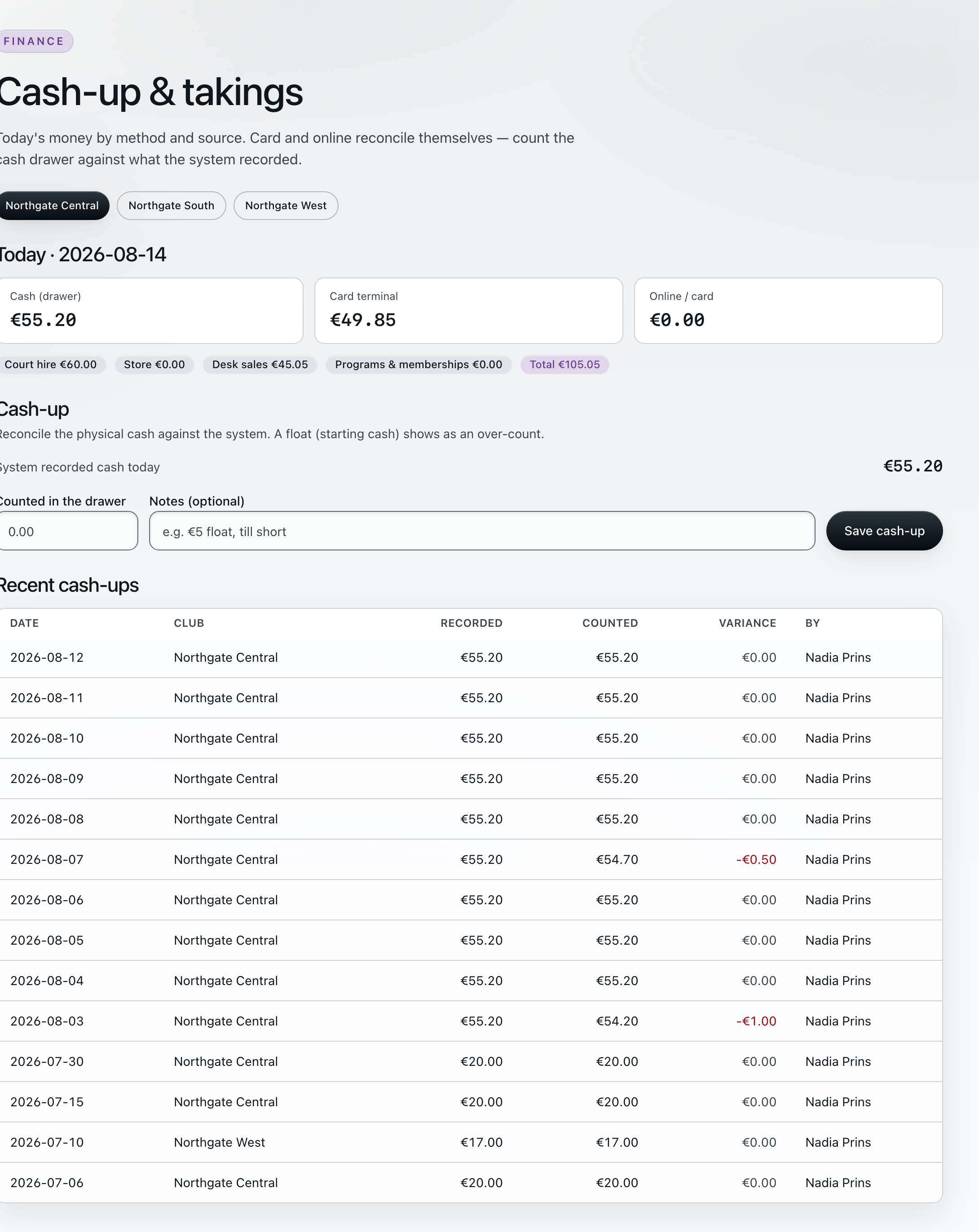
cash-up · end of day · redrawn at phone scale
Cash-up · Fri 14 AugNorthgate Central
BY PAYMENT METHOD
Cash (drawer)€55.20
Card terminal€49.85
Online / card€0.00
Total recorded€105.05
BY SOURCE
Court hire€60.00
Desk sales€45.05
Store€0.00
Last count · recorded €55.20 · counted €55.20Variance €0.00 ✓
By method
Cash and card terminal, side by side. Card settles itself, so the only thing anyone has to count is the cash.
By source
Register sales, court hire and guest fees, split out. When the drawer is short, the split says where to look.
VAT export
A day or a week of takings as a CSV, split per VAT rate, ready for the bookkeeper and the BTW return.
Staff roles
Owners shape the club. The office runs it. The desk runs the day.
Three roles, and behind them 34 things a person can be allowed to do, switched on one at a time. The desk gets everything a shift needs, and nothing that moves money on its own.
Shapes the club.
Locations, plans, prices, the catalogue, the roles themselves and who holds them.
Runs the week.
Schedule, people, enrollment, payments, refunds, the decision inbox and the office email inbox.
Runs the day.
Booking board, court hire, the register, the drawer count, member lookup and roll-call assist. The desk can file a refund request; only office and owner move money.
Tuned to the person.
34 capabilities behind the three roles, switched on or off per person — so the weekend supervisor can close the day, and the student who works Saturday mornings rings up sales.
Anna · Front desk5 of 34 capabilities shown
✓Take payments at the desk
✓Count the drawer and close the day
✓Book, move and cancel court hire
✓Look up a member or household
Issue a refundREQUEST ONLY · OFFICE DECIDES
What sits under the roles
- Audit log
- Who changed what, and when — in every plan
- Consent
- GDPR consent records held per person
- Subject rights
- Per-subject data export and anonymisation workflows
- Legal documents
- Data Processing Agreement, business subscription terms and service privacy notice, published at permanent versioned URLs: app.contaktacademy.com/legal ↗
Desk mode
The register and the day, on the iPad at the counter.
Desk mode is its own screen: the catalogue, the open sale, today’s bookings and the drawer count, sized for an iPad standing on the counter and worked one-handed between conversations. Academy also includes native iOS and Android apps, so coaches, households and office staff carry the same records off the counter.
Which plan
The register is part of Academy Complete.
Core and Plus take court-hire payments at the desk. The catalogue, the drawer count and the VAT export come with Complete.
Academy Complete is €349 / month + VAT. It adds the tap-to-sell catalogue, the cash-up by method and source, the VAT CSV for the bookkeeper, and iPad desk mode. See full pricing →
Book a walkthrough
Bring us your till roll.
We’ll set up your catalogue, your VAT rates and your court rates, then close a day with you — cash counted, variance on screen, VAT exported.